Where does student work go after the grade?
Most of it is filed and never opened again. Here a project becomes a solution another institution can install, with the research and the review still attached to it.
Your first steps
Who decides how a person's skills are grouped, before anyone files a certificate? Here is the path a university takes as steward of the person tree, from being named to the release.
-
Found your workspace
Found your university's workspace. The person tree cannot be released until a steward is named, and the refusal says who names one.
-
Named as steward
The operator of the instance names your university steward of the person tree. Nobody can name themselves.
-
Seed the tree
One click drafts the families and a proposal. Nothing is released yet.
-
A student's tree today
A student who adopts capabilities now finds them under “Not filed yet” in their life domain.
-
Your steward panel
The panel shows the proposal and every family it adds. Only your university may work in it.
-
Release the tree
Release the version. The families are published and your university is credited as steward.
-
The tree after release
The student's capabilities move onto the families they belong to. What fits no family stays under “Not filed yet”.
- Not built yet
Hand the tree on
Export the released tree, fork it and hand it over to another workspace.
Four questions a university asks before it takes part
- Where does student work go after the grade?
- What worked becomes a solution with its Setup and Run processes, and the verdict of its review stays attached to it.
- Who decides what "cooking" or "project management" means for every person on the instance?
- The instance's operator names a steward for the person tree, and the steward releases each version of its families, credited by name.
- Who vouches for a certificate a student brings from elsewhere?
- The student submits it to your workspace, a member reviews it in the verifier queue, and a passing review shows on the student's profile with your workspace's name.
- Who checks a solution's four pillars?
- Examiners review the solution against the four FAIR pillars and agree on a tier before its Passport is issued.
Work on a problem somebody actually has
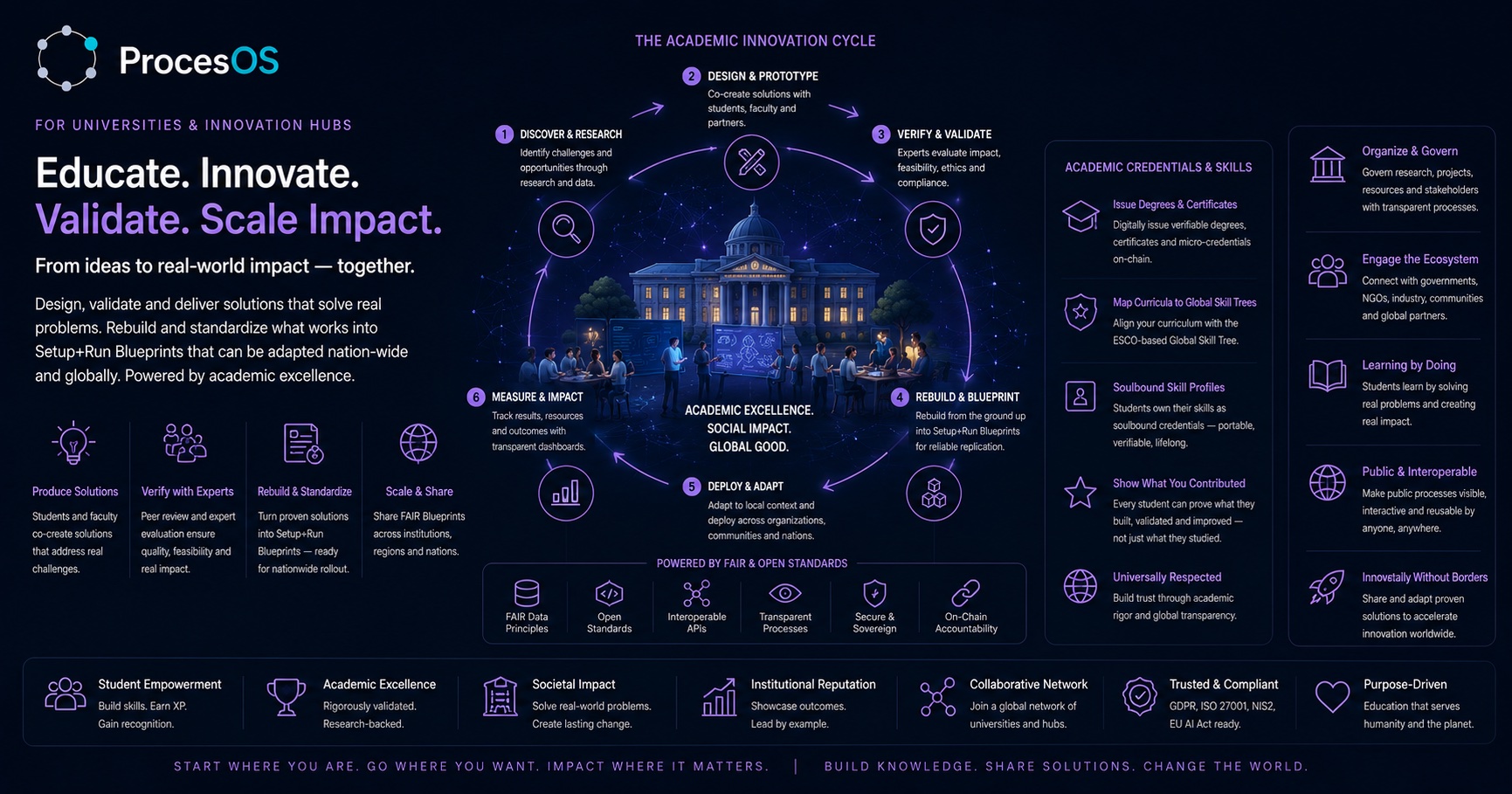
Students and faculty build the answer to a real challenge. What comes out is a process, with the research and the data behind it.
See what a published solution looks likeHave it reviewed by people who know
Peer review and expert evaluation decide whether it holds up on quality, ethics and effect. The verdict stays attached to the work.
How review and validation workRebuild it into something reusable
Turn what worked into a solution with its Setup process and its Run process, ready for the next institution to install.
Browse the marketplaceIssue credentials anyone can check
Award degrees, certificates and micro-credentials mapped onto ESCO, the European reference list of skills and occupations.
Look at the academyThe FAIR Passport
A solution carries a Passport once examiners have looked at all four pillars and agreed on a tier. It is the first thing another institution asks about.
What the four pillars askWhat does a FAIR Passport actually check?
Four pillars, each examined on its own and weighed into one result. A solution does not carry a Passport because it exists. It carries one once examiners have scored all four and decided on a tier.
Respectful Entry
How the solution arrived where it is used. Who was asked before it started, what they agreed to, and what happens when the answer is no.
Shared Development
Who built it with whom. Whether the local partners hold a real share of the design, and whether they can keep it running once the original team leaves.
Data Stewardship
Who the data belongs to, where it is kept, and who is still allowed to read it in five years.
Sustainable Impact
Whether the effect outlives the funding. The money model, the people who operate it, and whether it can be repeated somewhere else.
A decided Passport carries a tier: Bronze, Silver or Gold. Every instance publishes the rubric it scores against, so you can read the bar before you apply.
Two ways a university works here, told step by step
Anna, tree steward at a university
Her university wants the skills its students record to mean the same thing everywhere on the instance.
- She founds the university's workspace.
- The instance's operator names the university steward of the person tree. Until then a release is refused, and the refusal says who assigns one.
- One click seeds draft families and a first proposal. Nothing is released yet.
- Her panel shows the proposal, while the students' capabilities still hang on a twig called "Not filed yet".
- She releases the version. The families are published with her as steward, and a student's cooking moves into its family.
- Not built yet She exports the tree, forks it or hands it over to another university.
Result: Every person on the instance files a skill under the same families, and the families name who stands behind them.
A programme lead
A cohort finishes, and the next one starts in the autumn.
- ProcesOS drafts a course for each lane of the process the cohort works in, from its validated version.
- She sets how long the certificate stays valid and how a retake works.
- The lane names that certificate as the minimum its seat requires.
- Someone who takes on the lane without it receives a quest to complete the course first.
Result: The certificate runs out on schedule, and the lane seats only the people who hold it.
Start free. Scale with your needs.
Change often fails when the wrong people are left out. So you pay per workspace, and every stakeholder you invite is free.
Starter
For initial process clarity
- 1 workspace, up to 5 members
- Unlimited stakeholder invites
- 3 validated processes at a time
- BPMN editor and basic analytics
- Governance wizard
- AI assistant (15K tokens/week)
- Academy access and community support
Professional
For consultants and teams actively improving processes
- Unlimited validated processes
- AS-IS/SHOULD-BE versioning
- Workspace cockpit and KPIs
- Advanced governance and reports
- Gamification studio
- Module access
Team & Scale
For multi-workspace structures and API-driven integration
- Up to 5 workspaces included
- +€39/mo per additional workspace
- Team management and groups
- White-label options
- API access
- BYOK for AI
- Priority support
Education, non-profit or public sector? In the discovery call we look at whether your project qualifies for a reduced licence. Ask as well if your operating model is not listed here.
Check eligibility in a discovery callWhat does it cost per person?
A process is only signed off by the people who actually run it. When every one of them needs a paid seat, the invite list gets shortened and the sign-off is worth less. Every amount here is per workspace, so it divides by everyone you bring in.
| People in the workspace | Team & Scale €249 per month | Pilot Set €219 per month |
|---|---|---|
| 5 | €50 | €44 |
| 20 | €12 | €11 |
| 50 | €5 | €4 |
The monthly list price divided by the people who use it, rounded to the euro. Professional and Team & Scale set no limit on how many people a workspace has.
Capability Modules
Add specialized capabilities to your Pro or Team plan. Mix and match as needed.
AI Studio
AI assistant, auto-edit, diagram from documentation. Includes 500K AI tokens a month for the whole workspace, or bring your own key on Team & Scale.
Compliance & Certification
Gap analysis, scoring and a certification pipeline for the frameworks you are audited against, among them DORA, NIS2 and ISO 27001.
ESG & Resources
Resource tracking, greenhouse gas accounting across Scopes 1 to 3, and sustainability scoring.
CMDB & IT Governance
A registry of your IT systems with their licence costs and the landscape they sit in. FAIR assessment included.
Continuity & Resilience
What stands still when a system fails: the cascade through dependencies, processes and partners, with recovery times held against what each process can bear. Builds on the CMDB.
Global Technology Tree
Plan capabilities as a graph: what your organisation can do today, what it needs next, and what each step depends on.
Solutions Marketplace
Publish solutions with Sustainable Impact scoring, and submit them for the FAIR Passport, which AIFOD's examiners decide.
Academy Publisher
Create courses, certifications, and on-chain credentials for your workspace.
Odoo ERP Integration
Connect your Odoo instance: partners, projects and resource data flow into the processes you model.
hiop.io DataOps
Managed data pipelines through hiop.io. They ingest and transform operational data, then hand it back to your processes.
Save with Bundles
Select a bundle to highlight the modules it includes.
Turn one course into something another institution can run.
Join the universities and innovation hubs whose work leaves the campus.